Claude Code weekly limit
The Claude Code weekly limit caps all your use across a week, and it resets at a fixed day and hour tied to your account. It applies to all models, and claude.ai draws from it too. Some plans, such as Max and Ultra, also have a separate weekly limit for Fable.
By The Pacewick team (Product and testing). Last updated .
.claude/projects folder hereHow to set your weekly reset in the dashboard, step by step
- Run /usage in Claude Code, or open Settings > Usage on claude.ai, and find the next weekly reset.
- Write down the day of the week and the hour it shows.
- Drop your .claude/projects folder on the dashboard on this page.
- Open the weekly reset setting and type that day and hour.
- Read the week panel, which now counts from your real reset instead of a rolling 7 days.
The dashboard is free and runs in your browser. The first 3 CSV reports each day are free too; see the pricing page for more, or read how we test the tool.
Claude Code weekly limit tested with a real input
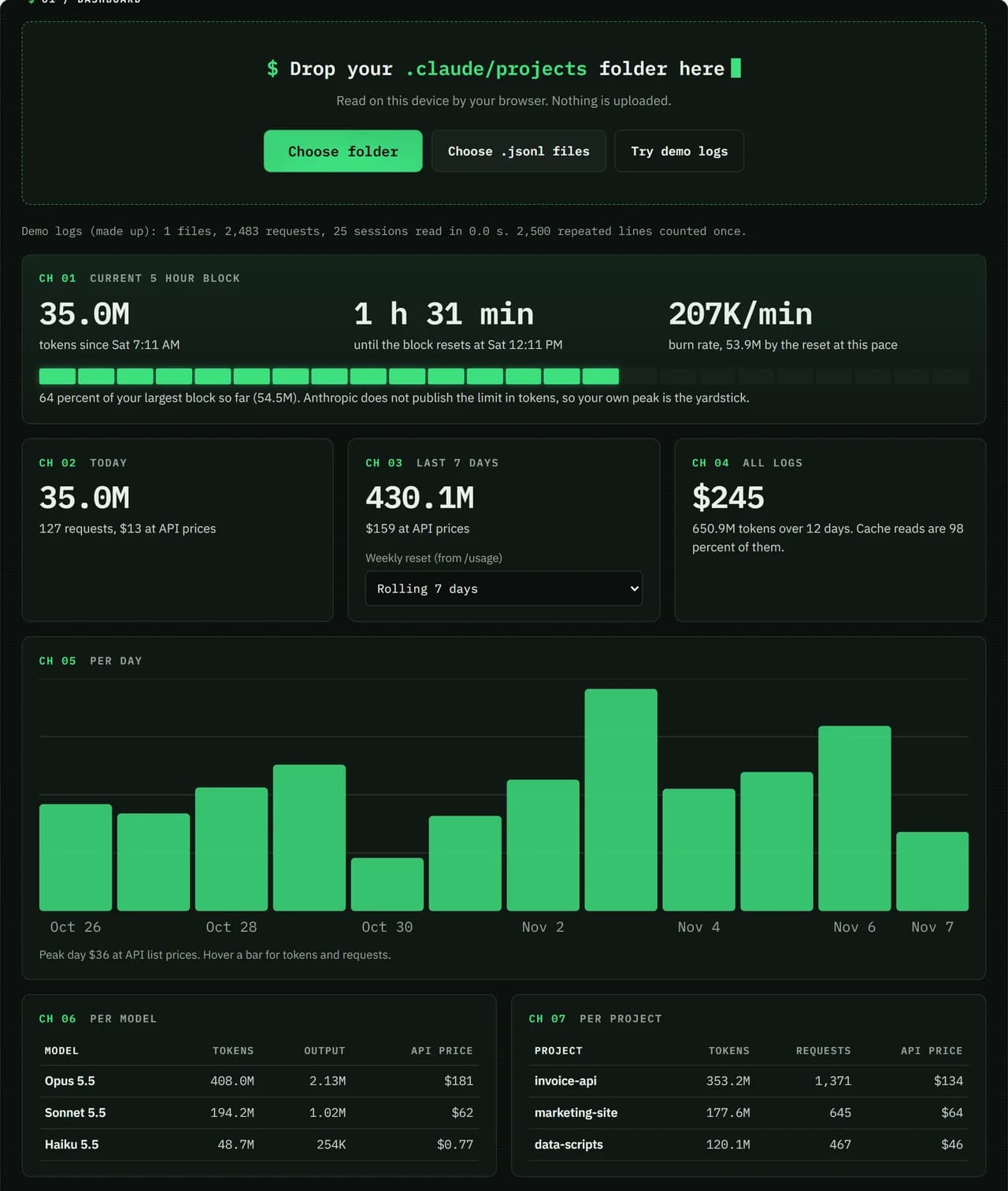
We ran our made up demo log through this exact dashboard. The numbers come from the same run, so you can compare them with your own logs.
- Test input
- Demo log: 12 days, 3 made up projects, 7,466 lines
- Output
- Dashboard on the demo log
- Requests counted
- 2,483
- Repeated lines skipped
- 2,500
- Total tokens
- 650.9M
- Cache reads
- 97.7 percent
- API list price
- $244.63
- 5 hour blocks
- 24
- Log size
- 3.2 MB
- Parse time
- 35 ms
How we test: every page uses the same demo log, and we check each total by hand. More on the about page.
How the Claude Code weekly limit resets
Anthropic gives every account a fixed weekly reset time. The day and the hour stay the same each week. They do not follow your signup date, and they do not move when you start a session.
So your week may not match the calendar week at all. For example, it might run from Thursday at 6 PM to the next Thursday at 6 PM. Settings > Usage shows the next reset, and that date is the only one worth planning around.
The separate Fable weekly limit
On some plans, including Max and Ultra, Fable has its own weekly limit. It sits next to the general weekly limit, which covers all models. As a result, you can run low on Fable while you still have room for other models.
In practice, model choice becomes part of weekly planning. Save Fable for the work that needs it, and use other models for routine edits. The /usage screen also breaks down what is using your limit and gives suggestions, so check it when you lean on Fable.
Planning a week of work
A weekly limit rewards an even pace. If you spend most of it in two heavy days, the rest of the week gets tight. Instead, look at your past weeks in the dashboard and see how your use spreads out. Then set a rough daily share and adjust as you go.
Remember the shared pool, too. Chats on claude.ai, the desktop app and mobile all count toward the same weekly limit. So if you plan a big coding push near the end of your week, keep chats light in the days before. Usage credits in Settings > Usage are a backup if you still run short.
Setting the Claude Code weekly limit anchor
By default, the week panel uses a rolling 7 days. That works for trends, but it will not line up with your plan. Once you type the reset day and hour from /usage, the panel counts from the same moment as Anthropic.
Still, the dashboard cannot see everything. Pacewick is an independent tool, not made by Anthropic, so it reads only what Claude Code writes on your machine. Chats on claude.ai are missing, and the real limit stays on Anthropic's servers. Use the panel for your pace, then confirm the official figure in /usage before a big push.
The weekly limit at a glance
| Item | Detail |
|---|---|
| Reset time | a fixed day and hour per account |
| Models covered | all models |
| Fable | a separate weekly limit on some plans, such as Max and Ultra |
| Shared with | claude.ai, desktop, mobile and the IDE extensions |
| Where to check | Settings > Usage and /usage |
Claude Code weekly limit FAQ
What day does the Claude Code weekly limit reset?
There is no single day for everyone. Each account has its own fixed day and hour, which you can see in Settings > Usage or with /usage.
Does the weekly limit reset when my subscription renews?
No. The weekly reset stays at the same time each week, no matter when your subscription started or renews.
Is Fable separate from the Claude Code weekly limit?
On some plans, yes. Max and Ultra have a separate weekly limit for Fable next to the general weekly limit for all models.
What can I do if I hit the weekly limit early?
You can wait for the reset, buy usage credits in Settings > Usage, upgrade your plan or use API credits from the Claude Console.
Why does the week panel differ from /usage?
The dashboard sees only Claude Code logs, while /usage counts chats on claude.ai and the apps as well. Without a reset anchor, the panel also uses a rolling 7 days.