ccusage alternative
Pacewick is a ccusage alternative for people who would rather not use a terminal. It reads the same local Claude Code logs, but in your browser, with charts and a per project table. There is nothing to install, and the files never leave your device. For JSON output or other agent CLIs, ccusage stays the better fit.
By The Pacewick team (Product and testing). Last updated .
.claude/projects folder hereHow to use this ccusage alternative, step by step
- Open the projects folder inside .claude in your home folder (on Windows it is %USERPROFILE%\.claude\projects).
- Drag the folder onto the drop zone above, or press Choose folder and pick it.
- Wait a few seconds while the browser reads the logs on this device.
- Read the current 5 hour block, then the cost per day chart for the last 30 active days.
- Then open the model and project tables to compare them with your ccusage daily report.
The dashboard is free and runs in your browser. The first 3 CSV reports each day are free too; see the pricing page for more, or read how we test the tool.
Ccusage alternative tested with a real input
We ran our made up demo log through this exact dashboard. The numbers come from the same run, so you can compare them with your own logs.
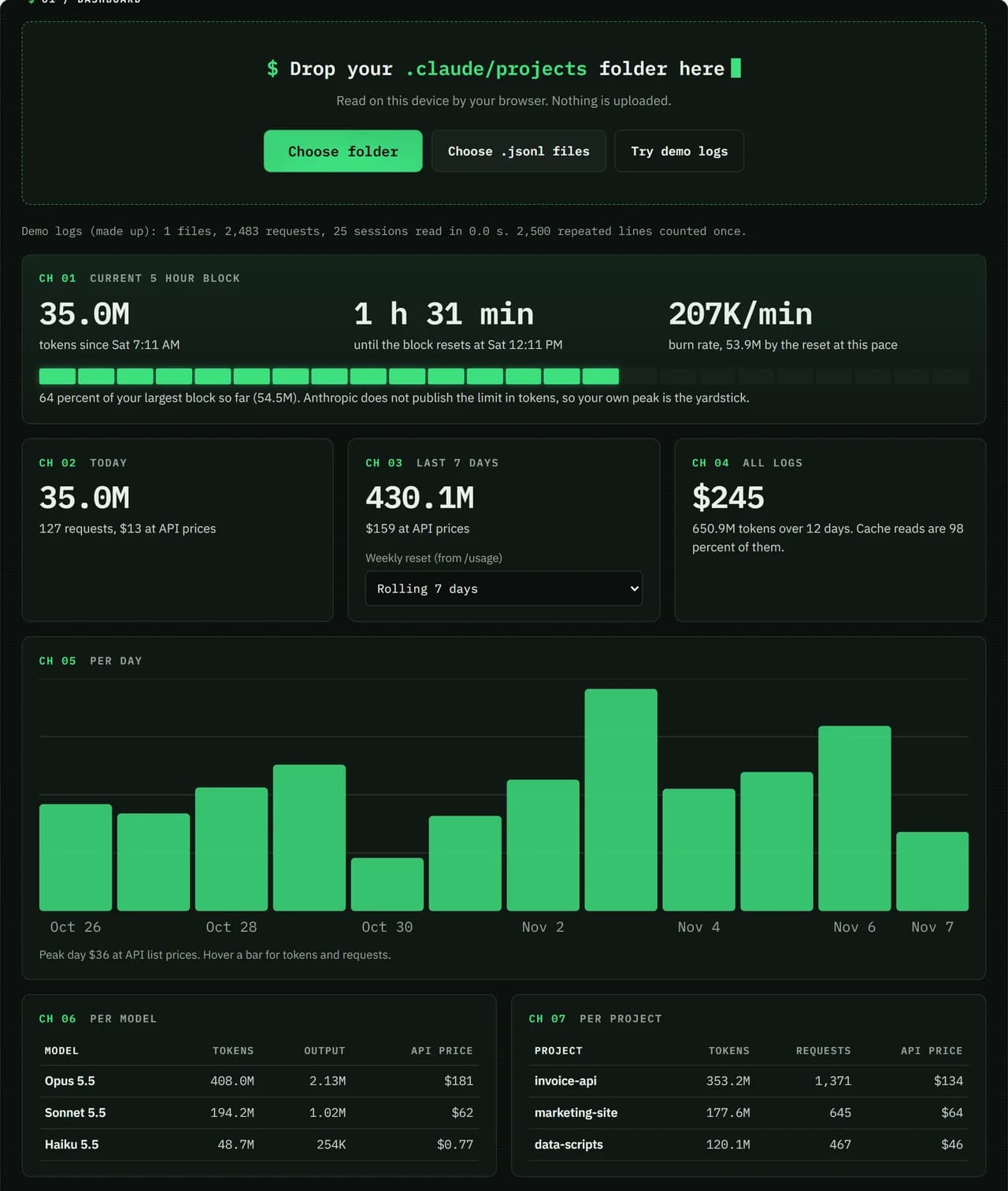
- Test input
- Demo log: 12 days, 3 made up projects, 7,466 lines
- Output
- Dashboard on the demo log
- Requests counted
- 2,483
- Repeated lines skipped
- 2,500
- Total tokens
- 650.9M
- Cache reads
- 97.7 percent
- API list price
- $244.63
- 5 hour blocks
- 24
- Log size
- 3.2 MB
- Parse time
- 35 ms
How we test: every page uses the same demo log, and we check each total by hand. More on the about page.
What ccusage does well
ccusage is a free, open source command line tool under the MIT license. You run it with npx, bunx or pnpm dlx, so there is no global install. It reads local usage data and prints daily, weekly, monthly and session reports with token counts and costs in US dollars.
It also has a blocks report for the Claude Code 5 hour windows, with monitoring of the active block. On top of that, it offers JSON output, a per model breakdown, date filters, grouping by project and a status line for Claude Code in beta. Besides Claude Code, it reads logs from many other agent CLIs, such as Codex and Gemini CLI.
Why look for a ccusage alternative
A terminal report is quick if you already work in one. Still, some people would rather click than type commands, and some work on Windows machines without Node.js set up. For them, a table of numbers in a console is not the easiest way to spot a trend.
Pacewick covers that case. It reads the JSONL files in your browser tab and draws the cost per day as a bar chart. In addition, it shows the current 5 hour block with a gauge, a burn rate and the time to reset. It works the same on Windows, macOS and Linux.
How Pacewick compares with ccusage
Both tools read the logs that Claude Code keeps on your computer. Both show cache write and cache read tokens on their own, and both put a US dollar price on the tokens. Pacewick also counts each answer once, even though the log repeats it on several lines.
The difference is the interface and the scope. Pacewick is a page, not a CLI, and it focuses on Claude Code alone. For the 5 hour block, it compares your current block with your own largest block. That is because Anthropic does not publish the limit in tokens.
When ccusage is the better choice
Choose ccusage if you live in the terminal and want a report with one command. It is also the right pick for scripts, since it can print JSON. Likewise, if you use Codex, OpenCode or other agent CLIs, ccusage puts all of them in one report.
Choose Pacewick if you want charts, a per project table and no install at all. You can also use both, since they read the same files. Note that Pacewick is independent and is not made by Anthropic or by the ccusage authors.
ccusage and Pacewick side by side
| Feature | ccusage / Pacewick |
|---|---|
| Where it runs | terminal via npx or bunx / any modern browser |
| Reports | daily, weekly, monthly, session, blocks / day, model, project, 5 hour block |
| Output | tables and JSON / charts, tables and an optional CSV report |
| Agent CLIs | Claude Code plus many others / Claude Code only |
| How logs are read | from local files / in your browser, never uploaded |
Ccusage alternative FAQ
Is there a ccusage alternative without a terminal?
Yes. Pacewick runs in your browser. You drop your .claude/projects folder on the page, and it shows the same kind of totals in charts and tables.
Is ccusage free?
Yes. ccusage is open source under the MIT license, and you can run it with npx ccusage@latest without a global install.
Does ccusage work with Claude Code?
Yes. It reads Claude Code logs and has daily, monthly, session and 5 hour blocks reports. It also reads logs from other agent CLIs.
Do the two tools show the same numbers?
They read the same log files, so the totals should be close. Small gaps can come from different price tables or time zones.