Claude Code usage tracker
A Claude Code usage tracker keeps a record of your tokens and API cost over weeks, not just the current session. First raise cleanupPeriodDays so Claude Code stops deleting old logs after 30 days. Then drop your .claude/projects folder on this page to see history per day, project and model, and save a CSV report.
By The Pacewick team (Product and testing). Last updated .
.claude/projects folder hereHow to set up a Claude Code usage tracker for weeks, step by step
- Open ~/.claude/settings.json and set cleanupPeriodDays to a larger number, for example 365.
- Keep working as usual, since Claude Code writes every session to the projects folder.
- Once a week, drop your .claude/projects folder on the dashboard on this page.
- Enter your weekly reset day and hour from /usage so weeks line up with your plan.
- Compare the per project and per model tables with the week before.
- Save a CSV report when you want the totals in a spreadsheet.
The dashboard is free and runs in your browser. The first 3 CSV reports each day are free too; see the pricing page for more, or read how we test the tool.
Claude Code usage tracker tested with a real input
We ran our made up demo log through this exact dashboard. The numbers come from the same run, so you can compare them with your own logs.
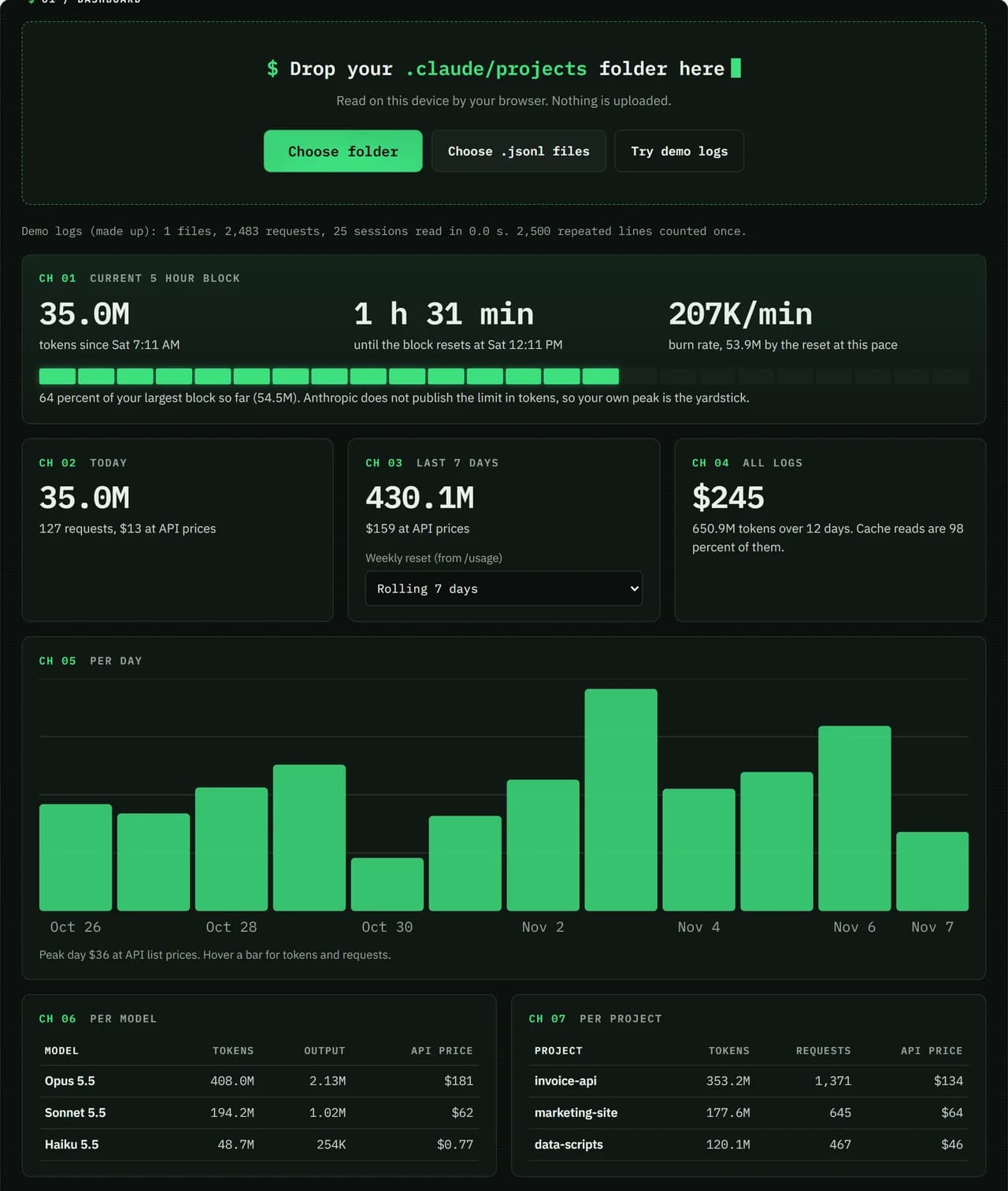
- Test input
- Demo log: 12 days, 3 made up projects, 7,466 lines
- Output
- Dashboard on the demo log
- Requests counted
- 2,483
- Repeated lines skipped
- 2,500
- Total tokens
- 650.9M
- Cache reads
- 97.7 percent
- API list price
- $244.63
- 5 hour blocks
- 24
- Log size
- 3.2 MB
- Parse time
- 35 ms
How we test: every page uses the same demo log, and we check each total by hand. More on the about page.
Why a Claude Code usage tracker needs longer logs
By default Claude Code deletes session files older than 30 days when it starts. That setting is called cleanupPeriodDays. So without a change, any tracker can only look back about a month, no matter how good it is.
To fix it, raise cleanupPeriodDays in ~/.claude/settings.json, for example to 365. On Windows the folder is %USERPROFILE%\.claude. After that, your history grows every day, and the dashboard can read all of it.
History per project and per model
Each session lives in a JSONL file under a folder named after the project path. Because of that, the dashboard can split totals by project without any setup. You see which repo used the most tokens this month, and whether that changed from last month.
In the same way, the model table shows how work spreads across Opus, Sonnet, Haiku and Fable. That matters, because prices per token differ a lot between models. For example, moving routine tasks to a cheaper model shows up here as a lower API price per day.
Weekly trends that match your plan
Paid plans also have a weekly limit that resets at a fixed day and hour for each account. You can read that time in /usage or in Settings > Usage on claude.ai. Then type it into the dashboard, and the week panel follows your real reset.
Without it, the page uses a rolling 7 days instead. Either way, a week to week view tells you more than a single session. In fact, it is often the only way to notice a slow climb before it turns into a hard stop.
Exporting your tracked usage as a CSV report
When you want the numbers outside the browser, save a CSV report. It holds totals per day, model, project and 5 hour block. Project names stay hidden unless you tick the box, and prompts or code are never part of it.
Three reports a day are free, and credits allow more. Keep in mind that this tracker cannot see claude.ai chats, which count toward the same limit. Pacewick is an independent tool, not made by Anthropic.
What decides how far back your history goes
| Item | Detail |
|---|---|
| Default cleanupPeriodDays | 30 days, old sessions deleted at startup |
| Where to change it | ~/.claude/settings.json |
| Session file location | ~/.claude/projects/<project folder>/<session id>.jsonl |
| Moving the folder | set CLAUDE_CONFIG_DIR to another path |
| Free CSV reports | 3 per day, more with credits |
Claude Code usage tracker FAQ
Why is my Claude Code history only 30 days long?
Claude Code deletes session files older than cleanupPeriodDays at startup, and the default is 30. Raise it in ~/.claude/settings.json to keep more.
Can I get back logs that were already deleted?
Not from Claude Code. Once the files are gone, no tracker can read them, so change the setting as early as you can.
Can a Claude Code usage tracker split usage per project?
Yes. Each project has its own folder of session files, so the dashboard shows tokens and API price for every project.
Does the tracker CSV report include my prompts?
No. It carries totals only. Project names are left out unless you choose to include them.