Claude Code usage limits
Claude Code usage limits come in two layers on paid plans: a session limit that resets every 5 hours and a weekly limit that resets once a week. Chats on claude.ai, desktop and mobile draw from the same limits. Verified Ultra accounts skip the 5 hour limit and keep only the weekly one.
By The Pacewick team (Product and testing). Last updated .
.claude/projects folder hereHow to stay inside your Claude Code usage limits, step by step
- Run /usage in Claude Code to see your plan usage bars and what is using up the limit.
- Open Settings > Usage on claude.ai to check the current session and the time until it resets.
- Drop your .claude/projects folder on the dashboard on this page to see your burn rate in the current 5 hour block.
- Type your weekly reset day and hour from /usage into the week setting, so the dashboard counts the same week as your plan.
- When a warning appears, finish the current step, then wait for the reset, buy usage credits or move to a bigger plan.
The dashboard is free and runs in your browser. The first 3 CSV reports each day are free too; see the pricing page for more, or read how we test the tool.
Claude Code usage limits tested with a real input
We ran our made up demo log through this exact dashboard. The numbers come from the same run, so you can compare them with your own logs.
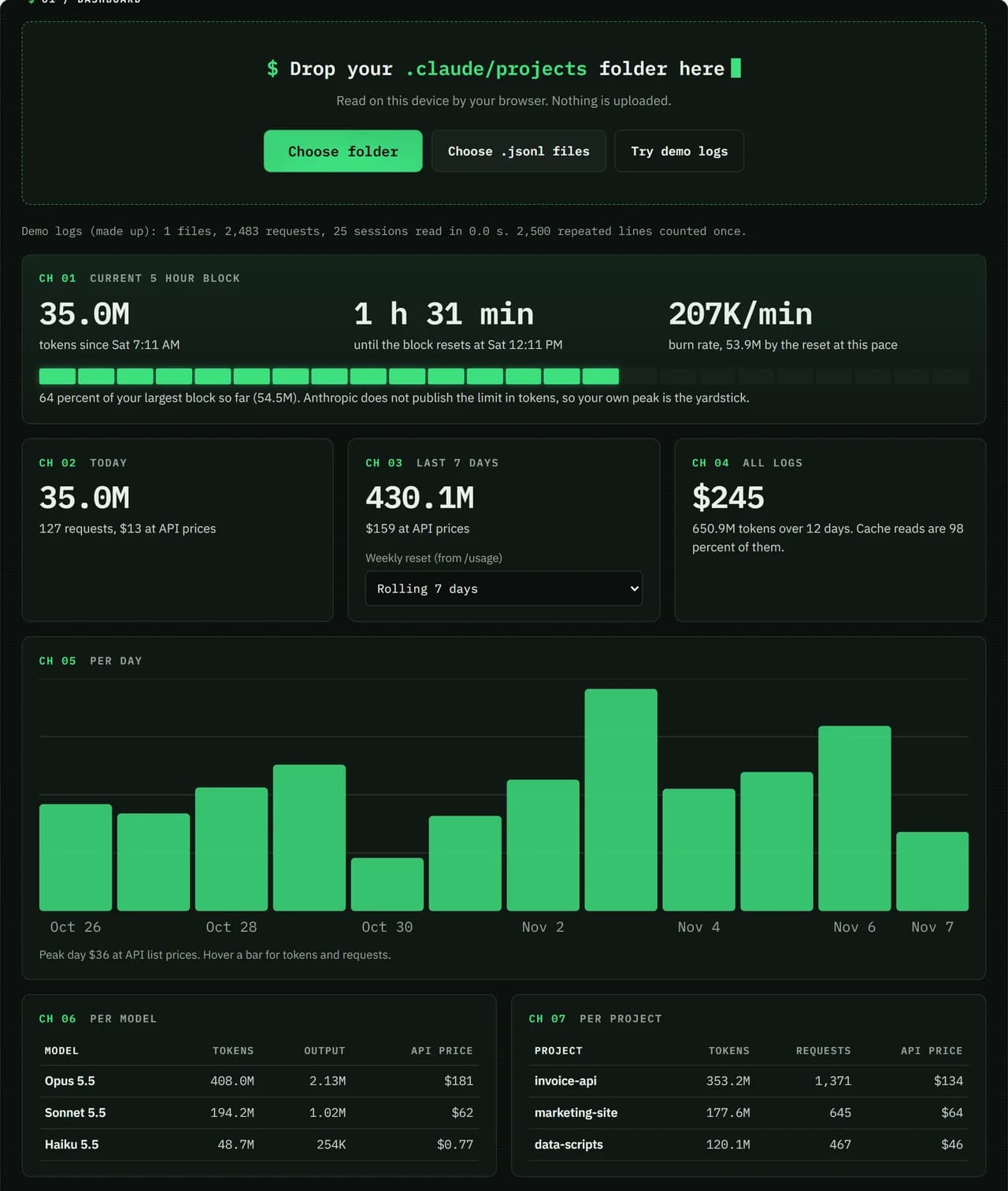
- Test input
- Demo log: 12 days, 3 made up projects, 7,466 lines
- Output
- Dashboard on the demo log
- Requests counted
- 2,483
- Repeated lines skipped
- 2,500
- Total tokens
- 650.9M
- Cache reads
- 97.7 percent
- API list price
- $244.63
- 5 hour blocks
- 24
- Log size
- 3.2 MB
- Parse time
- 35 ms
How we test: every page uses the same demo log, and we check each total by hand. More on the about page.
How Claude Code usage limits work
Every paid plan has two limits. First, a session limit opens with your first message and resets in full 5 hours later. Second, a weekly limit resets at a fixed time each week. That day and hour belong to your account, so they stay put when you start a new chat or renew your plan.
The weekly limit covers all models. In addition, some plans, such as Max and Ultra, have a separate weekly limit for Fable. Anthropic can change limits over time, and it does not publish them in tokens or messages. So any number you read on a forum is a guess, not a rule.
What makes you reach a limit sooner
Several things change how fast you burn through your allowance. Long and complex conversations use more than short ones. The model matters too, and so does the effort level you pick. Also, the features you turn on add to the load.
Your chats and your coding share one pool. A research chat on claude.ai, a question on your phone and a refactor in the terminal all count. The IDE extensions for VS Code, Cursor and JetBrains use the same pool as well. However, the dashboard on this page reads only Claude Code logs, so it cannot see those chats. Treat its block gauge as a lower bound and check /usage when you are close.
Claude Code usage limits by plan
Pro and Max both have the 5 hour session limit and the weekly limit. Ultra works differently. Verified Ultra accounts have no 5 hour limit at all, so only the weekly limit applies to them. Max and Ultra also carry the separate Fable weekly limit.
The plans differ in one more way. If you hit the 5 hour limit in the middle of an answer, Claude Code can briefly finish the step and shows "Usage limit reached · wrapping up". Pro gets this once per weekly period, while Max gets it each time within the weekly limit. Anthropic is rolling this out gradually, so you may not see it yet.
What to do when you hit a limit
You have four options. First, you can wait for the reset, and the countdown on this page helps you time it. Second, you can buy usage credits in Settings > Usage. Third, you can upgrade from Pro to Max or from Max to Ultra. Finally, API credits in the Claude Console are another path.
Be careful with the API route, though. If the ANTHROPIC_API_KEY environment variable is set, Claude Code uses that key instead of your plan. It then bills each request at API rates, even while your subscription still has room. So check your shell profile before a long session if the bill matters to you.
Limits on paid Claude plans
| Item | What applies |
|---|---|
| Session limit | starts with your first message, resets in full 5 hours later |
| Weekly limit | fixed day and hour per account, covers all models |
| Fable | separate weekly limit on some plans, such as Max and Ultra |
| Verified Ultra | no 5 hour limit, weekly limit only |
| Shared with | claude.ai, desktop, mobile and the IDE extensions |
Claude Code usage limits FAQ
Are Claude Code usage limits the same as claude.ai limits?
Yes. It is one shared pool. Chats on claude.ai, the desktop and mobile apps, and Claude Code all count toward the same 5 hour and weekly limits.
How many tokens do I get on Claude Pro?
Anthropic does not publish its limits in tokens or messages, and it can change them. The /usage screen shows your official usage bars, which is the only exact view.
Why is Claude Code charging me API prices?
Check for the ANTHROPIC_API_KEY environment variable. When it is set, Claude Code uses the API key instead of your subscription and bills at API rates.
Can I keep working after I hit the limit?
Yes, in a few ways. You can buy usage credits in Settings > Usage, upgrade your plan or add API credits in the Claude Console. Otherwise, wait for the reset.