Claude Code 5 hour limit
The Claude Code 5 hour limit is a session cap that starts with your first message and resets in full 5 hours later. Pro and Max plans have it, while verified Ultra accounts do not. The dashboard on this page counts down the current block and shows how fast you are using it.
By The Pacewick team (Product and testing). Last updated .
.claude/projects folder hereHow to pace a 5 hour block, step by step
- Drop your .claude/projects folder on the dashboard above to load the current block.
- Read the countdown to see how many minutes are left before the block resets.
- Check the burn rate and the projection, which estimate where the block will end at your current pace.
- Compare the gauge with your largest finished block, since Anthropic does not publish the limit in tokens.
- If the projection runs high, save big tasks for the next block and run /usage for the official bar.
The dashboard is free and runs in your browser. The first 3 CSV reports each day are free too; see the pricing page for more, or read how we test the tool.
Claude 5 hour limit tested with a real input
We ran our made up demo log through this exact dashboard. The numbers come from the same run, so you can compare them with your own logs.
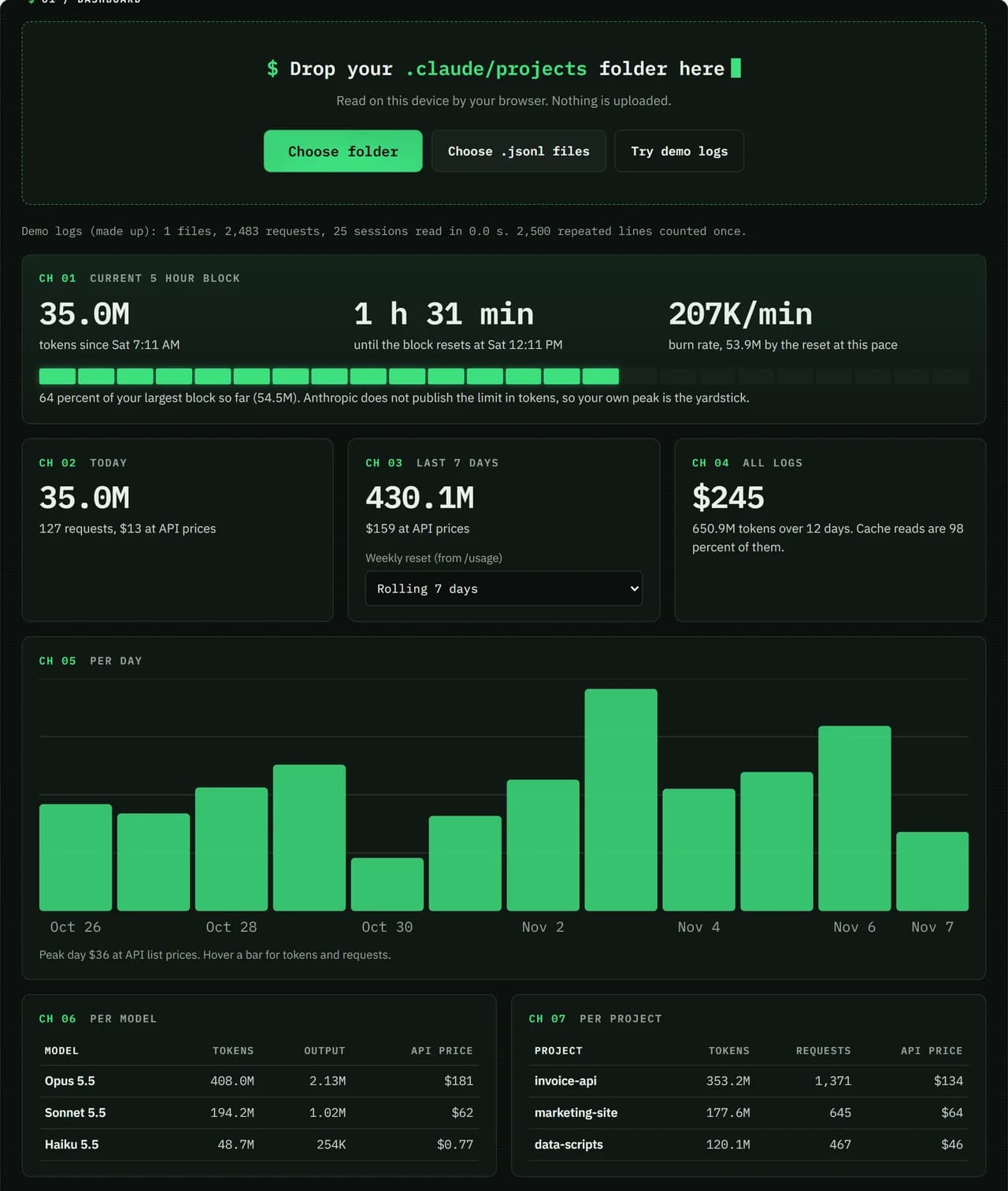
- Test input
- Demo log: 12 days, 3 made up projects, 7,466 lines
- Output
- Dashboard on the demo log
- Requests counted
- 2,483
- Repeated lines skipped
- 2,500
- Total tokens
- 650.9M
- Cache reads
- 97.7 percent
- API list price
- $244.63
- 5 hour blocks
- 24
- Log size
- 3.2 MB
- Parse time
- 35 ms
How we test: every page uses the same demo log, and we check each total by hand. More on the about page.
How the Claude Code 5 hour limit window works
This window is not a fixed slot on the clock. It opens with the first message you send and lasts 5 hours. When it ends, the whole allowance comes back at once. Your next message after that opens a new window.
Because of this, the gaps between windows depend on you. If you start at 8 AM, the reset lands at 1 PM. But if you take a long break and return at 3 PM, the next window runs until 8 PM. The dashboard follows the same rule when it splits your logs into blocks.
When you reach the Claude Code 5 hour limit
Claude Code warns you as you get close to the limit. If you still reach it in the middle of an answer, Claude can briefly finish the current step. During that time you will see the message "Usage limit reached · wrapping up".
How often you get this depends on the plan. Pro accounts get it once per weekly period. Max accounts can get it every time, as long as they are still within the weekly limit. Anthropic is rolling the feature out gradually, so some accounts may not have it yet.
Pacing tips that stretch a session
A few habits help a block last longer. First, pick the model and the effort level that fit the task, since both change how fast you use the limit. Second, keep conversations focused, because long and complex sessions use more. Third, remember that claude.ai chats share the same limit.
It also helps to plan when a window starts. For example, save a heavy job like a large refactor for the start of a fresh window, so it does not stall halfway. Likewise, a short question before lunch starts the clock while you are away. Then you come back to a window that resets sooner.
Reading the block countdown
The top panel of the dashboard shows the tokens used in the current block, the minutes left and your burn rate. Burn rate is the block's tokens divided by the minutes since it started. From that, the dashboard projects where you will be when the block resets.
The gauge compares your block with the largest block you have finished before. It is a guide, not the real limit, which Anthropic keeps on its servers. Also, claude.ai chats do not appear in Claude Code logs, so the true limit may be closer than the gauge shows. When it matters, trust /usage.
The 5 hour limit in short
| Question | Answer |
|---|---|
| When does it start? | with the first message you send |
| When does it reset? | in full, 5 hours later |
| Which plans have it? | Pro and Max; verified Ultra accounts do not |
| Wrap-up allowance | Pro once per weekly period, Max each time within the weekly limit |
| Exact remaining room | only in /usage or Settings > Usage |
Claude 5 hour limit FAQ
Does the 5 hour limit start when I open Claude Code?
No. It starts with the first message you send, not when you open the app or the terminal.
Is the Claude Code 5 hour limit a rolling window?
Not in the sense of a slow refill. The allowance resets in full 5 hours after your first message, and the next message after that starts a new window.
How many messages can I send in 5 hours?
Anthropic does not publish a number. The limit depends on factors like conversation length, model and effort level, and Anthropic can change it.
Why does the dashboard show more room than /usage?
The dashboard reads only Claude Code logs. Chats on claude.ai, desktop and mobile use the same limit but never appear in those logs.
Can Claude finish its answer if I hit the limit?
Often, yes. Claude Code can briefly wrap up the current step. Pro gets this once per weekly period, and Max gets it each time within the weekly limit.