Claude Code usage monitor
A Claude Code usage monitor tells you, during a working session, how fast you are spending your 5 hour block and when it resets. Drop your .claude/projects folder on this page to see the burn rate, the countdown and a projection. Then check /usage before a big task, because it shows the official plan bars.
By The Pacewick team (Product and testing). Last updated .
.claude/projects folder hereHow to monitor Claude Code usage during a session, step by step
- Open this page in a browser tab next to your terminal or IDE.
- Drop your .claude/projects folder on the dashboard to load the current 5 hour block.
- Read the burn rate in tokens per minute and the minutes left until the block resets.
- Check the projection to see where the block will end at your current pace.
- Drop the folder again after a heavy task to refresh the numbers.
- Before a long run, confirm the official bars with /usage inside Claude Code.
The dashboard is free and runs in your browser. The first 3 CSV reports each day are free too; see the pricing page for more, or read how we test the tool.
Claude Code usage monitor tested with a real input
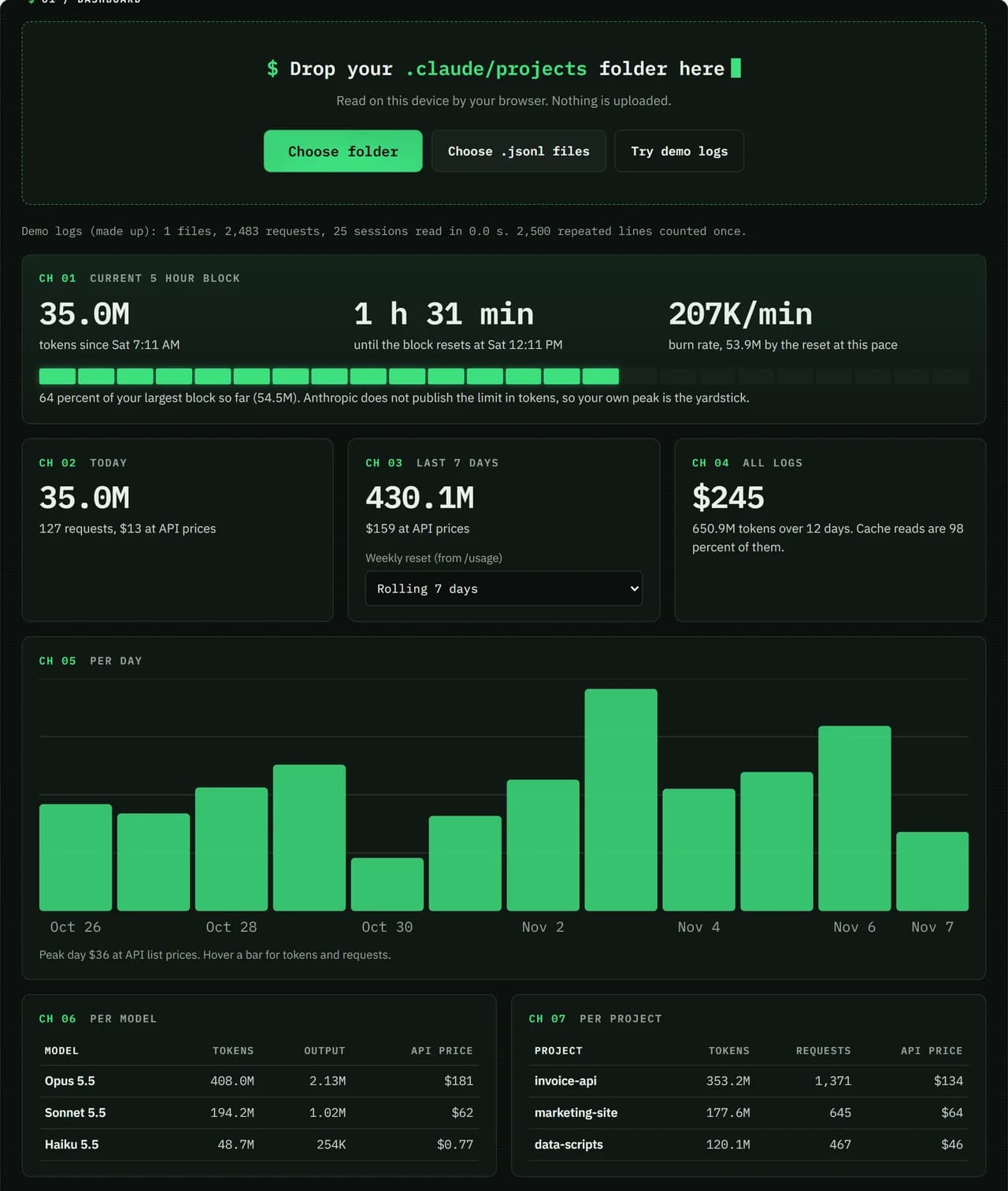
We ran our made up demo log through this exact dashboard. The numbers come from the same run, so you can compare them with your own logs.
- Test input
- Demo log: 12 days, 3 made up projects, 7,466 lines
- Output
- Dashboard on the demo log
- Requests counted
- 2,483
- Repeated lines skipped
- 2,500
- Total tokens
- 650.9M
- Cache reads
- 97.7 percent
- API list price
- $244.63
- 5 hour blocks
- 24
- Log size
- 3.2 MB
- Parse time
- 35 ms
How we test: every page uses the same demo log, and we check each total by hand. More on the about page.
What a Claude Code usage monitor watches
Most plans have a session limit that resets every 5 hours. That window opens with your first message and resets in full 5 hours later. So the useful question in the middle of a session is simple: how much of this block is gone, and how much time is left?
This monitor answers it from your own logs. It finds the current block, counts its tokens and shows the minutes until reset. A gauge then compares the block with the largest block you have finished, because Anthropic does not publish the limit in tokens.
Burn rate and the projection to reset
Burn rate is the tokens in the current block divided by the minutes since it began. In other words, it is your pace right now. For example, a long agent run with many tool calls will push it up fast, while a quiet review session keeps it low.
From that pace the page projects where the block will land at reset. If the projection already beats your largest block, it is a good moment to pause, switch to a lighter task or wait. Of course, this is an estimate, not a promise from Anthropic.
Warnings and the wrap up allowance
Claude Code itself shows warnings as you get close to a limit. If you hit the 5 hour limit in the middle of an answer, it may finish the step briefly with a wrapping up message. On Pro this happens once per weekly period, while on Max it can happen each time within your weekly limit.
Anthropic is rolling this out gradually, so you may not see it yet. That is one more reason to watch the burn rate before you start a big refactor.
Limits of a log based usage monitor
Your limit is shared across claude.ai, the desktop and mobile apps and Claude Code. However, only Claude Code writes the local logs this page reads. As a result, if you also chat on claude.ai, your real limit may be closer than the monitor shows.
Also, this page does not run in the background like a menu bar app. You refresh it by dropping the folder again. For the exact plan percentage, /usage is the only source, and Pacewick is an independent tool, not made by Anthropic.
What the monitor shows for the current block
| Reading | How it is worked out |
|---|---|
| Block start | your first message after the last block ended |
| Time to reset | 5 hours after the block start, minus time passed |
| Burn rate | block tokens divided by minutes since the block began |
| Projection | burn rate carried forward to the reset time |
| Gauge | current block compared with your largest finished block |
Claude Code usage monitor FAQ
Is there a Claude Code usage monitor that needs no install?
Yes. This page runs in any modern browser on Windows, macOS and Linux. You drop the logs folder and nothing is uploaded.
How do I know when my 5 hour block resets?
The block resets 5 hours after your first message. The dashboard shows the countdown, and Settings > Usage on claude.ai shows the official time.
Does the monitor update live?
No. It reads the logs when you drop the folder. Drop it again to refresh the burn rate and the countdown.
Why does Claude Code say I am near the limit when the monitor shows room?
Chats on claude.ai and the desktop app count toward the same limit, and they are not in Claude Code logs. Trust the warning and /usage.