Claude Code usage reset
The Claude Code usage reset works on two clocks: the session limit resets in full 5 hours after your first message, and the weekly limit resets at a fixed day and hour each week. That weekly time belongs to your account. Settings > Usage on claude.ai and /usage in Claude Code show when the next reset comes.
By The Pacewick team (Product and testing). Last updated .
.claude/projects folder hereHow to find your next reset time, step by step
- Open claude.ai, go to Settings > Usage and note the time left until the current session resets.
- On the same page, read the date and hour of the next weekly reset.
- In Claude Code, run /usage to check the same plan bars from the terminal.
- Type the weekly day and hour into the week setting of the dashboard on this page.
- Drop your .claude/projects folder and let the block countdown tell you when the current 5 hour block ends.
The dashboard is free and runs in your browser. The first 3 CSV reports each day are free too; see the pricing page for more, or read how we test the tool.
Claude Code usage reset tested with a real input
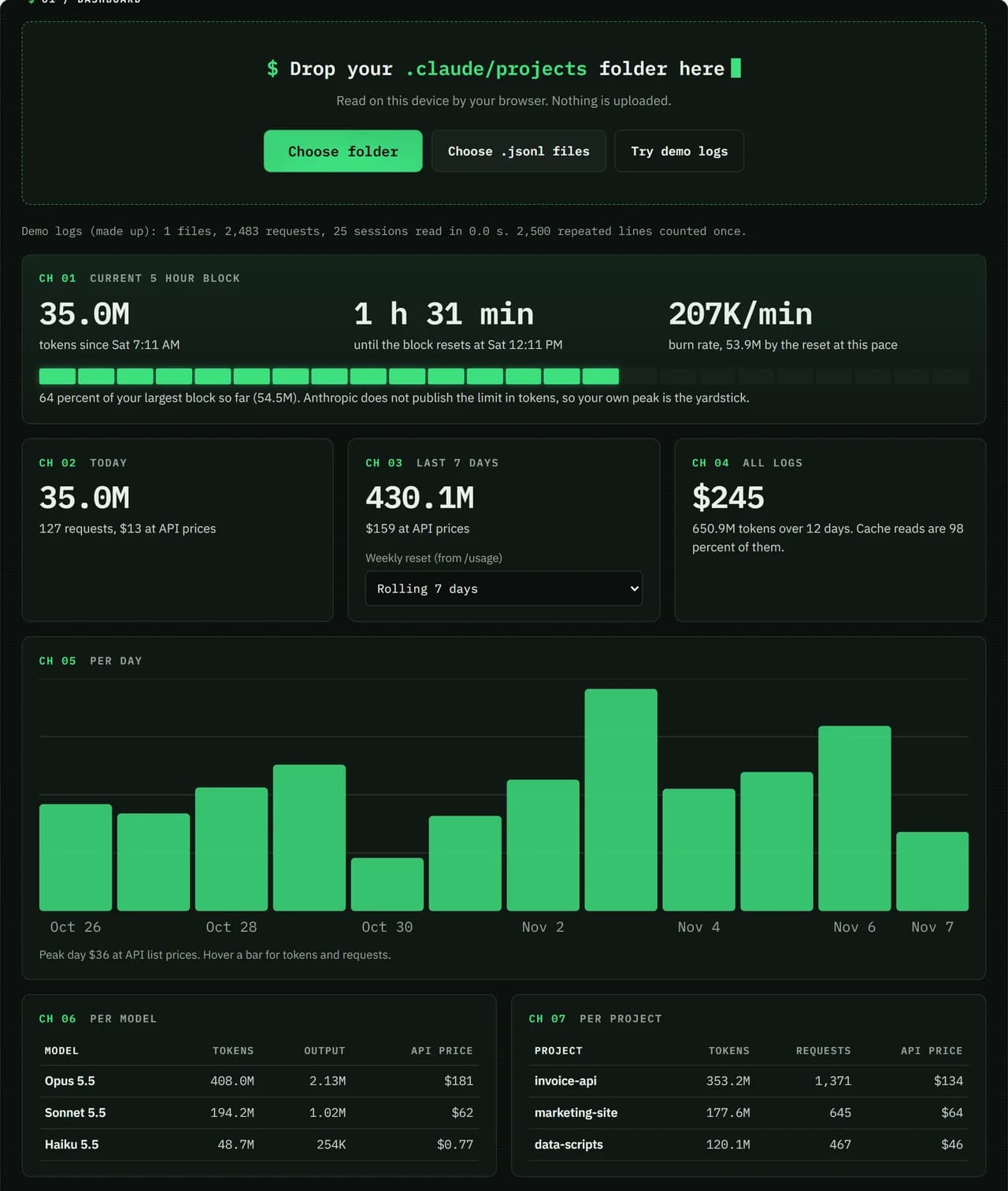
We ran our made up demo log through this exact dashboard. The numbers come from the same run, so you can compare them with your own logs.
- Test input
- Demo log: 12 days, 3 made up projects, 7,466 lines
- Output
- Dashboard on the demo log
- Requests counted
- 2,483
- Repeated lines skipped
- 2,500
- Total tokens
- 650.9M
- Cache reads
- 97.7 percent
- API list price
- $244.63
- 5 hour blocks
- 24
- Log size
- 3.2 MB
- Parse time
- 35 ms
How we test: every page uses the same demo log, and we check each total by hand. More on the about page.
When the 5 hour session resets
Your session clock does not start on the hour. Instead, it starts with the first message you send, and the limit resets in full 5 hours later. So if you send a prompt at 9:10 AM, that session ends at 2:10 PM, whether you used it all or barely touched it.
Nothing trickles back along the way. Your allowance stays used until the 5 hours pass, and then the whole amount returns at once. After that, your next message opens a fresh session with its own clock. As a result, a quiet hour does not delay the reset, but it does not save anything for later either.
How the weekly Claude Code usage reset works
The weekly limit runs on a different rule. Anthropic gives each account a fixed reset time, and the day and hour stay the same every week. They do not depend on when you subscribed or when you first used Claude that week.
This is easy to get wrong. For example, someone who signed up on a Friday may expect a Friday reset, yet the account can reset on a Tuesday evening. Similarly, a slow Monday does not shift the clock. The only reliable way to know is to look it up in Settings > Usage.
Common mix-ups about reset times
Many users expect the session to renew at midnight or at a round hour. It does not, because it follows your first message. Others think /clear resets their limit. In fact, /clear only resets the Session block inside /usage, which shows tokens and cost for API users, while your plan limits keep counting.
A third mix-up is the shared pool. Chats on claude.ai, the desktop app and mobile draw from the same limits as Claude Code. So you may run out before the reset you planned for, because a chat used part of the same allowance.
Planning around each Claude Code usage reset
The dashboard on this page reads your Claude Code logs and finds the current 5 hour block. It counts down to the moment that block ends and shows your burn rate. If the projection passes your largest past block well before the countdown ends, slow down or save big jobs for the next block.
For the week, type the reset day and hour you found in /usage. The week panel then counts from your real reset instead of a rolling 7 days. Keep in mind that the dashboard only sees Claude Code, so claude.ai chats are missing. The official numbers always live in /usage and Settings > Usage.
Reset times at a glance
| Limit or action | When it resets |
|---|---|
| 5 hour session limit | in full, 5 hours after the first message |
| Weekly limit | a fixed day and hour assigned to your account |
| Verified Ultra accounts | no 5 hour limit, weekly reset only |
| /clear in Claude Code | only the Session block in /usage, not plan limits |
| Where to check | Settings > Usage on claude.ai and /usage |
Claude Code usage reset FAQ
What time does my weekly limit reset?
It depends on your account. Anthropic assigns a fixed day and hour, and it stays the same every week. Check Settings > Usage or run /usage to see it.
Does the 5 hour limit reset at midnight?
No. It resets 5 hours after the first message of the session, so the exact time changes from day to day.
Does /clear reset my Claude Code usage?
Only the Session block in /usage, which shows tokens and cost for API users. Your 5 hour and weekly plan limits keep counting.
Why does my weekly reset not match my signup day?
The weekly reset is a fixed time tied to your account. It does not follow your subscription date or the day you first used Claude.
Do claude.ai chats change my Claude Code usage reset?
They do not move the weekly reset. However, they use the same limits, so they can leave you with less room before the next reset.