Claude Code token usage
Claude Code token usage is recorded in the session logs on your computer, split into input, output, cache write and cache read tokens. Drop the .claude/projects folder below to count them by day, model and project. In most logs cache reads are the biggest share by far, so a huge total is often cheaper than it looks.
By The Pacewick team (Product and testing). Last updated .
.claude/projects folder hereHow to see your Claude Code token usage, step by step
- Open the projects folder inside .claude in your home folder (on Windows it is %USERPROFILE%\.claude\projects).
- Drag the whole folder onto the drop zone above, or press Choose folder and pick it.
- Wait a few seconds while your browser reads the JSONL logs on this device.
- Check the token split first, so you know how much of the total is cheap cache reads.
- Then open the model and project tables to see where the input and output tokens go.
- Finally, run /clear in Claude Code when you switch tasks, and compare the next day with this one.
The dashboard is free and runs in your browser. The first 3 CSV reports each day are free too; see the pricing page for more, or read how we test the tool.
Claude Code token usage tested with a real input
We ran our made up demo log through this exact dashboard. The numbers come from the same run, so you can compare them with your own logs.
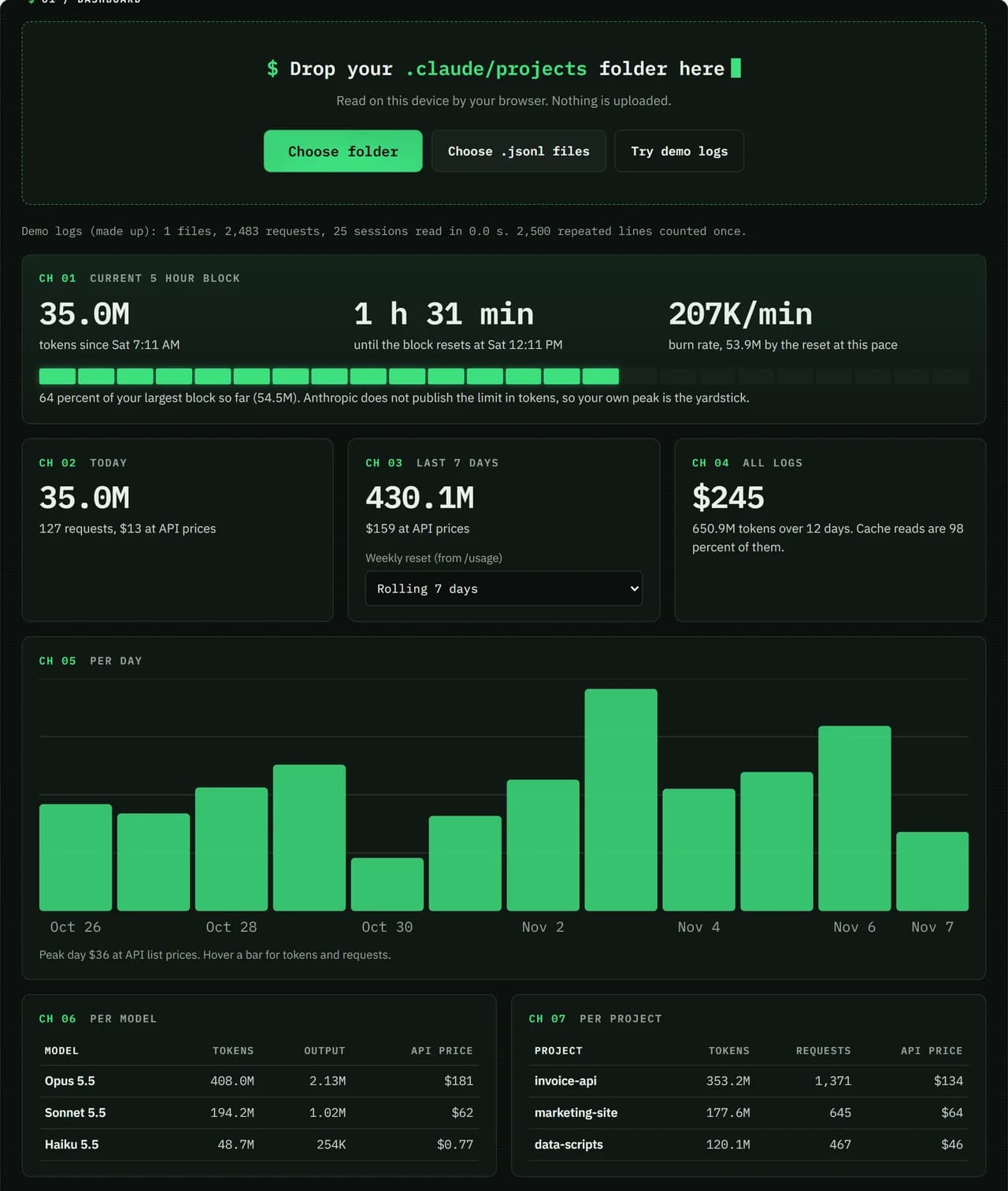
- Test input
- Demo log: 12 days, 3 made up projects, 7,466 lines
- Output
- Dashboard on the demo log
- Requests counted
- 2,483
- Repeated lines skipped
- 2,500
- Total tokens
- 650.9M
- Cache reads
- 97.7 percent
- API list price
- $244.63
- 5 hour blocks
- 24
- Log size
- 3.2 MB
- Parse time
- 35 ms
How we test: every page uses the same demo log, and we check each total by hand. More on the about page.
The four token types in Claude Code token usage
Every answer from Claude carries a usage record in the log. Input tokens are the new, uncached part of your prompt. Output tokens are what Claude writes back, and they cost the most per token. Cache writes store context for later turns, with a 5 minute or a 1 hour lifetime.
Cache reads are the fourth type. They are the context Claude reuses from the cache instead of reading it fresh. On most models a cache read costs about a tenth of the input rate. As a result, the same token count can mean very different bills, so the dashboard shows each type on its own.
Why cache reads dominate the total
Each turn in a session sends the whole conversation back to the model. Claude Code caches that context, so most of it comes back as cache reads. In one set of real logs we measured on Windows, cache reads made up 97.7 percent of all tokens.
That is why a total in the billions can look alarming at first. However, most of those tokens are the cheap kind. Without the cache, the same work would cost many times more. So watch the input and output columns when you want to know what drives the price.
One answer, several log lines, counted once
Claude Code writes one answer as several lines in the JSONL file, one for each content block. Each of those lines repeats the same usage record. If you simply add up every line, you count the same tokens two or three times.
For that reason, Pacewick keys every answer by its message id and request id and counts it once. On the real logs above, the parser skipped 156,647 repeated lines and kept 141,824 requests. In short, the totals you see match the work Claude actually did.
How to lower your token use
Anthropic lists the length of the conversation, the features you use, the model and the effort level as the things that drive usage. So a lower effort level and a shorter context both help. Long sessions grow the context with every turn, and every turn reads it again.
A simple habit is to run /clear when you move to a new task. The next prompt then starts from a small context instead of the whole history. After that, compare a day with /clear against a day without it in the dashboard, and keep what works for you.
Token types in a Claude Code log and how they are priced
| Token type | Price compared with input |
|---|---|
| input_tokens | the model input rate |
| output_tokens | about 5x the input rate |
| cache write, 5 minutes | 1.25x the input rate |
| cache write, 1 hour | 2x the input rate |
| cache_read_input_tokens | about 0.1x the input rate on most models |
Claude Code token usage FAQ
How do I check my Claude Code token usage?
Run /usage inside Claude Code for the plan bars. For history by day, model and project, drop your .claude/projects folder on this page.
Why is my token count so high?
Most of it is usually cache reads. Each turn reuses the whole conversation from the cache, and in our measured logs that was 97.7 percent of all tokens.
What is the difference between cache write and cache read?
A cache write stores context so later turns can reuse it, and it costs more than input. A cache read reuses that context and costs far less.
Does Anthropic publish the plan limit in tokens?
No. The limits on Pro, Max and Ultra are not published in tokens, so the dashboard compares your current 5 hour block with your own largest block.